
Get a year of super-useful advice
Solve your tech issues and get expert buying advice whenever you need it, all year for only £49.
Join Which? Tech SupportBy clicking a retailer link you consent to third-party cookies that track your onward journey. This enables W? to receive an affiliate commission if you make a purchase, which supports our mission to be the UK's consumer champion.

With over a decade of experience at Which?, Tom covers everything from tech advice to money-saving tips, and highlights the best deals during major sales events.

Moving your data from an old phone to a new one doesn't have to be difficult. Whether you're transferring from an iPhone to an iPhone, an Android to an Android, or switching between the two, both Apple and Google offer tools to help you get the job done.
If you've recently upgraded your iPhone, Apple's Quick Start feature lets you transfer your data wirelessly or with a cable. On Android, some of your data can be restored by signing in with your Google account on your new smartphone.
Below, we explain how to retire your old phone without leaving treasured contacts, pictures, videos and other important data behind.
Transfer from: iPhone to iPhone | Android to Android | iPhone to Android | Android to iPhone
Solve your tech issues and get expert buying advice whenever you need it, all year for only £49.
Join Which? Tech SupportAlready a Tech Support member? For more help and 1-to-1 technical advice, including buying advice, go to our Tech Support online booking tool.
To transfer data from your old iPhone to your new one, you can use Apple's Quick Start feature.
You can transfer your data wirelessly or, on supported devices, using a cable for a potentially faster transfer. Quick Start works if your old device is an iPhone or iPad running iOS 11, iPadOS 13, or later. The process uses both devices simultaneously, so it's best to start the transfer when you won't need your current phone for several minutes.
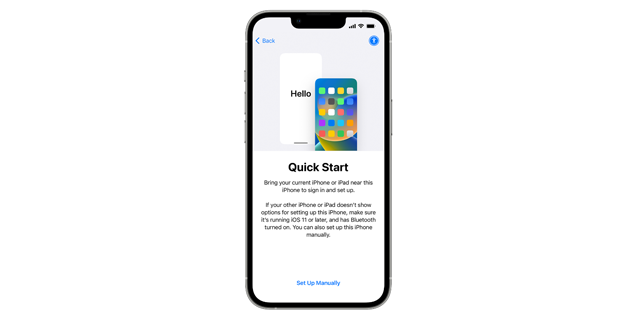
To transfer your data, do this:
Keep both devices near each other and plugged into power while the transfer completes. The time it takes will depend on how much data you're moving and the speed of your connection.
Get a great phone to suit your budget with our expert guide to the best smartphones.
If you're switching from one Android device to another, you can transfer apps, contacts, photos, videos, music and other audio, text messages, your wallpaper and more. The exact data that transfers may vary depending on your phone manufacturer and Android version.
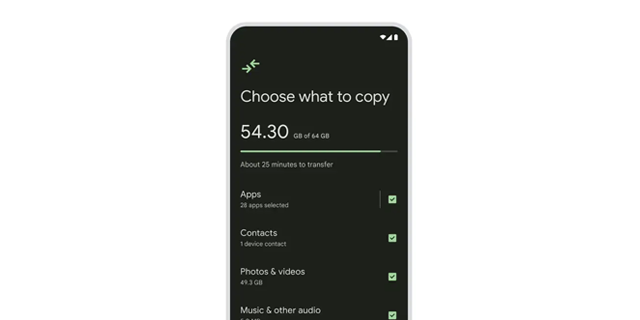
To transfer your data, do this:
Keep both phones close together until the transfer is complete. Larger photo and video libraries can take an hour or more to copy.
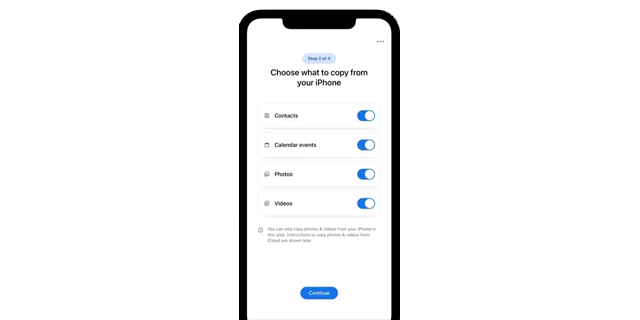
To transfer your data, do this:
Keep both devices connected and turned on until the transfer is complete. You can continue setting up and using your new Android phone while your data copies across in the background. It can take up to two days for your messages to appear in your new Android phone, so bear this in mind.
Find out how to securely dispose of your old device with our guide on how to recycle your mobile phone.
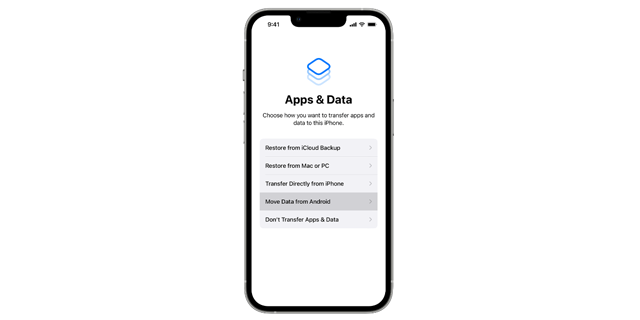
To transfer your data, do this:
During setup, you may also be able to transfer your phone number and Sim or eSim to your new iPhone, although this depends on your network and device compatibility.
Solve your tech issues and get expert buying advice whenever you need it, all year for only £49.
Join Which? Tech SupportWhich? Tech Support can help you keep on top of your home tech. Our experts explain things clearly so that you can resolve issues and feel more confident using your devices.
Get unlimited 1-2-1 expert support:
Join Which? Tech Support.


