By clicking a retailer link you consent to third-party cookies that track your onward journey. This enables W? to receive an affiliate commission if you make a purchase, which supports our mission to be the UK's consumer champion.
The vital security check to make before buying a smart device

Callum pushes tech to its limits and has spent over three years bombarding antivirus with malware, taxing routers and inspecting computer monitors

‘Smart’ technology introduces exciting innovations and features, but it also comes with an expiry date. This could mean a device that otherwise works well but loses key features and ceases getting security updates, which could put you at risk.
Checking this 'best before date' is an essential step if you're buying a new connected device for the home. It affects gadgets such as smartphones and smartwatches, but this now also extends to more traditional tech such as TVs, security cameras and even thermostats. However, the length of ongoing software and security support for these devices varies greatly.
We'll run down some of the best and worst support policies for popular tech to help you shop with confidence.
Tech brands with the best and worst support policies
As part of the Product Security and Telecommunications Infrastructure (PSTI) Act 2022, it's a legal requirement for manufacturers to publish ‘information on minimum security update periods.’ This is something Which? campaigned for over a period of more than 10 years. The Act also states that information ‘must be published and made available to the consumer in a clear, accessible and transparent manner.’ This should make details more obtainable for everyone, allowing you to make a wiser purchase of a smart device that will actually go the distance.
We’ve seen manufacturers promise support for as long as 10 years, but some commit to just two or three. To confuse things further, some brands measure the length of support from the date a model is introduced, while others measure from when a model is discontinued.
Smartphones

Longest guaranteed support: Given the vast amount of personal and private data stored on our phones and the rising cost of upgrading them frequently, choosing a brand that offers long-term software and security support has become increasingly attractive.
Google offers the most consistent support commitment. From the Pixel 8 onwards, Google’s phones receive at least seven years of support from when they’re launched. Newer Samsung phones also get seven years, and some Fairphone models receive eight years of guaranteed support from launch. However, this isn’t promised across the board and both brands offer just five years for some older phones.
The ‘mixed bag’ middle ground: Apple promises five years of support from launch. We've found that in reality this extends to six years or more, but this isn’t guaranteed. While solid, the world's largest smartphone maker – on paper, at least – falls behind more committed competitors.
Nothing provides between four and six years of support from launch. OnePlus and Oppo both guarantee at least three years of updates, with some phones getting as much as six years. The Motorola phones we’ve tested typically receive four or five years of support from launch, although one of its models will be supported for seven years.
Shortest support periods: Xiaomi promises at least two years of support from launch. It also says that it ‘may support the security updates for three years or longer for some models.’ Plus, it notes that ‘if a very serious security vulnerability is discovered, we may also provide necessary security fixes to you, even if your device is in the EOL (end-of-life) product list.’
Although this is somewhat reassuring, the overall figure is pretty meagre compared to other smartphone brands. Additionally, Xiaomi doesn’t elaborate on what it considers to be a ‘very serious security vulnerability’. The promise of longer guaranteed software and security support from other manufacturers is a far better bet.
Head to our best smartphones page for more details on mobile phone brand support.
Tablets

Longest guaranteed support: Samsung currently offers the longest support period. Starting with its Galaxy Tab S10 Lite, S11 and S11 Ultra tablets, you’ll get at least seven years of software support from launch. Earlier Samsung tablets received four to six years of guaranteed support, but this recent greater commitment puts Samsung on top for tablet brands.
The ‘mixed bag’ middle ground: Since January 2021, Microsoft tablets get six years of support from launch. Earlier models only received four years, meaning these older tablets are now increasingly obsolete. Apple promises a minimum of five years from launch, although this may be extended for longer, as with its smartphones. Meanwhile, Amazon promises at least four years.
Shortest support periods: Lenovo is the straggler of the group – it currently provides between two and three years from launch, depending on the model. This makes Lenovo tablets the least attractive investment, and it may want to take a leaf from Samsung and Microsoft’s book and improve its support length.
See our dedicated tablet and iPad support guide for expert tips and more information.
Smart TVs

Longest guaranteed support: Samsung arguably offers the best support length, recently increasing it to seven years for eligible TVs running on the Tizen operating system. Other Samsung models and LG TVs receive five years from the model’s launch date. While this is a comparatively decent amount of time, most people probably won’t want to update their TV every five or so years. You can probably eke out a bit more time before this lack of support becomes a problem, but it's a far cry from the ‘non-smart’ TVs of years gone by, which could soldier on for a decade or more.
The ‘mixed bag’ middle ground: Amazon Fire TVs are guaranteed at least four years of support, currently provided with updates until the end of 2030. Hisense’s smart tellies will get four years of support from launch, as will Sony models.
Shortest support periods: Panasonic previously offered five years of support, which would have ranked it alongside LG. However, it now says it will only provide three years of guaranteed support. Philips doesn't appear to offer a typical support policy, but we’ve previously estimated it to be around three years from launch.
Take a look at our best smart TVs page for more advice on security and support.
Security cameras

Longest guaranteed support: Google Nest security cameras have the longest support guarantee, with at least five years promised from launch.
The ‘mixed bag’ middle ground: Amazon Ring and Blink offer a competitive four years of support from launch. For both, Amazon states that if you purchase your device from Amazon or Ring/Blink directly, it will ‘support your device with software security updates until at least four years from when you bought it new’. It's best to consider this as four years of support from launch, unless otherwise specified.
Starting in January 2024, Yale security cameras are supported for at least four years from the model’s launch. Ezviz also promises ‘firmware security upgrade support for no less than four years’. Arlo typically promises three years of support from each model’s launch. TP-Link states the ‘support will end three years after the product’s end-of-life date’. Reolink also promises to support devices 'for at least 3 additional years from the EOL date.' This potentially means that some TP-Link and Reolink cameras could rival or be supported for longer than Google Nest equivalents.
Shortest support periods: Imou promises just two years of support from launch, making it the most paltry option here.
For more security and software support guidance, see our best indoor security cameras and best outdoor security cameras guides.
Wi-fi extenders and mesh systems

Longest guaranteed support: Considering home networking devices, such wi-fi extenders and mesh systems, are gateways to the internet, you’d hope they would have the most committed brands to providing long-term software and security support. Sadly, this isn’t always the case. Amazon Eero devices are supported for at least five years. Amazon states that if you purchase an Eero model from the Amazon or Eero website, you’ll receive the five years from the point of sale. If purchased elsewhere, it advises you to check dates on its website. Generally, think of this as five years of support from the launch of individual Eero models, unless otherwise specified.
Devolo and Google are also a solid options. They promise at least five years of support from when models are first made available. Like Amazon, both provide a list of devices and support end-dates for reference.
The ‘mixed bag’ middle ground: Asus commits to four years of support for its home networking devices, but it does state that this may be extended. It lists specific end-of-support dates on its website.
Shortest support periods: Mercusys, Netgear and TP-Link state that support for devices will end three years after the end-of-life date. As with other manufacturers, all three also show end-of-support dates on their websites. Compared to rivals, these dates aren’t bad, but as a wider category, it represents a pretty measly commitment to ongoing support. It would be good to have greater investment in this to avoid the need of semi-regularly updating devices which are prime targets for cyber criminals.
Check out our best wi-fi extenders and mesh systems page for details on how we test security and which models we recommend.
What about laptops?
Although laptops aren't mandated to provide minimum support periods under PSTI, they shouldn’t cause too much concern as many will receive security updates through the operating system they run on.
- Windows laptops that run on Windows 11 should be supported until October 2031. This may be extended, however, as was the case with Windows 10, which is currently expected to lose support in October 2027.
- Chromebooks run on ChromeOS, which will end in 2034, at which point Google switches to Googlebook OS. While a new Chromebook will be supported until then, you can find expiry dates for older laptops on Google's update policy page..
- Currently, Apple Macs are promised at least five years of support from launch, but this will likely be extended further.
Other smart product brands
An excellent example of long-term commitment from a manufacturer is Tado, which promises ten years of support from release for its smart radiators. Compared to many of the companies discussed earlier, this is a considerably greater commitment to its devices and customers. This is contrasted by Honeywell, which offers just two years of support after the end-of-life date for each of its smart radiators.
Of all the traditional tech giants, Samsung consistently offers some of the longest support lengths for its smart devices. In addition to those discussed above, Samsung also promises seven years of support for its smartwatches from the Galaxy Watch 7 and later. This is an increase from the three to five years of support for older Galaxy smartwatches.
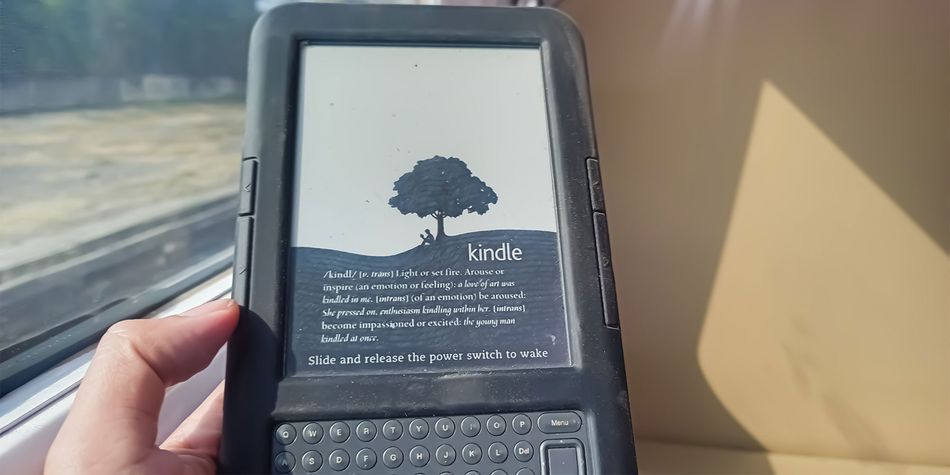
One of the greatest support periods was provided by Amazon for its Kindle e-readers. Until recently, its first ever Kindle was still supported, meaning it had enjoyed a whopping 18 years of support. This changed in May of this year when all models produced prior to 2012 saw support end.
These old Kindles now no longer have the ability to buy and download ebooks from the Kindle Store. Additionally, Amazon warned that if they’re factory reset, they would now become totally unusable and obsolete. It's unlikely we’ll see support offered for this length of time again – Amazon promises just four years of guaranteed support for its new Kindles.
You can find more information about what we know about smart device support periods in our guide to smart homes and security.
What happens when a device is no longer supported?

When a smart device becomes unsupported, it will no longer receive firmware updates and security patches.
Security
Security patches are required to tackle newly discovered threats and vulnerabilities. Although, in the immediate short term, the risk remains fairly low for a device that no longer receives support, it will become increasingly inept and ill-equipped at handling threats as time goes by.
As tech support software becomes outdated, it becomes an easier target for cybercriminals. Plus, newer technology, especially AI, has made it easier for hackers to detect and exploit vulnerabilities. It has also lowered the barrier of entry for dodgy individuals to take advantage.
This shouldn’t panic users – again, in the short term, the risk remains fairly low. It just means that updating obsolete devices should be a priority. Also, certain devices – such as smartphones and tablets – can be riskier than others, such as smart radiators.
In the meantime, the National Cyber Security Centre (NCSC) has some advice on keeping yourself safe when using devices that no longer receive security updates:
- ‘Reduce the likelihood of compromise by preventing obsolete devices from accessing untrusted content, effectively making it hard for malicious content to reach the device and exploit it.’ For example, you could only visit trusted websites or completely deactivate the devices connection to the internet.
- ‘Reduce the impact of compromise by preventing access to sensitive data or services from the vulnerable devices, so even if the devices are compromised, the damage will be minimised.’ Examples of sensitive data or services include banking apps, shopping apps and work-related emails and apps.
Where possible, you can also shore up defences by using third-party antivirus software to detect malware. However, the NCSC warns ‘their effectiveness may be reduced, as the products may not be updated when running on an unsupported operating system and signatures may not be tuned to detect attacks targeted at obsolete systems.’
The NCSC warns, however, ‘this guidance does not provide a risk-free way of continuing to use obsolete products, but will help to reduce the risks of doing so. The only fully effective way to mitigate this risk is to stop using the obsolete product.’
Compatibility
To continue using features on smart devices or to access new ones, firmware patches are required. When this support ends, features will become unavailable or increasingly outdated and potentially buggy. Eventually, they’ll become completely unusable. An example of this is the recent end of support for the earliest generation of Kindles, which can no longer redownload or buy new ebooks from the Kindle store.
This is annoying, and serious questions about the length of support should be asked. But in fairness to manufacturers, ongoing support for older devices, especially as newer generations replace them, will become a financial burden and drag on their resources.
So what should you do? Don’t panic in the immediate short term, be cautious with how you use obsolete devices and move to update them in the near future.
How to shop smart for a smart device

A vital additional step to take when shopping for smart tech is to check the support period. As you’ve noticed from the examples highlighted above, these can vary greatly. A quick check could save you from wasting money on a smart device that will become obsolete sooner than a similar alternative.
Although Which? includes guidance on typical support policies in our advice pages, the best source to check is the manufacturer’s website. As part of PSTI, brands are legally required to publish information on the defined minimum guaranteed support period (with an end date). This should be easily accessible, but it can be tricky to navigate brand websites to find this information.
Typically, it's best to do a quick Google search, which should take you to the relevant page. Alternatively, use the Ask AI Mode in Google Search. For example, you could type in: ‘how long will my [brand] product receive updates under PSTI’ or ‘[brand and model] PSTI statement’.
The manufacturer website will usually include a full list of models with end-of-support dates. These will be updated as support for existing models ends, new models are released and if support is extended or shortened. Failing that, it's always worth confirming on the brand’s website via a live chat service or by contacting them via email.
Information will be displayed in one of two ways. It’ll either be presented in a list with devices, release dates and end-of-support dates shown – an example of this is seen here with Google; or it’ll be shown through a PDF document for each individual model, as seen here with Apple. This second method isn’t as clear. You’ll want to look for the release or first supply date, and the defined support period, to know when support will end.
Pre-owned tech

Pre-owned tech has become increasingly popular. Buying and selling second-hand gadgets is already a thriving industry and great deals can be found on the likes of Amazon, CEX, eBay and Gumtree. In many cases, older models, especially those a generation or two behind the current model, are just as good.
Although this is great for bargain hunters looking for a stellar deal, it could mean that you’re buying a device that's about to lose support or already has. Again, it just reinforces the importance of checking the device’s support period beforehand to avoid this scenario.