By clicking a retailer link you consent to third-party cookies that track your onward journey. This enables W? to receive an affiliate commission if you make a purchase, which supports our mission to be the UK's consumer champion.
Meta Quest 3S vs 3: Is it worth the upgrade?

Jonny blends rigour with the ridiculous to find what works, from chasing Bluetooth trackers nationwide to piercing bin bags with a force gauge.

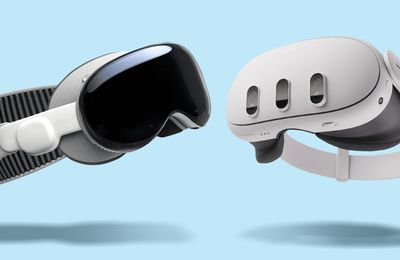
Meta’s Quest 3S is the most affordable VR headset yet. The tech giant's entry-level headset costs £290, while its flagship Quest 3 will set you back £470. They look similar on paper, so is it worth shelling out more for the Quest 3?
I’ve long been intrigued by VR, but figuring out if the Quest 3’s upgrades are worth it over the budget-friendly 3S is a puzzle when you're just starting out.
To find out if that extra £180 buys you a better experience, I put both headsets through a series of tests – from intense gaming to movie nights. Keep scrolling to find out how the Quest 3 and 3S compare on everything from display quality and mixed reality to comfort and battery life.
Find the latest VR headset deals - from Meta Quest 3 to Apple's Vision Pro
What's the difference between the Meta Quest 3 and 3S?
A lot of the core specs are the same on the Quest 3 and Quest 3S. They’re powered by the same processor, use the same controllers and tracking system, and can run the exact same games and apps.
The table below focuses only on the specs that differ – find out what difference they actually make in practice below.
| Specification | Meta Quest 3 | Meta Quest 3S |
|---|---|---|
| Price | 512GB model (SQUIRREL_TEXT_50018513) | 128GB model (SQUIRREL_TEXT_50020362) |
| Display resolution (per eye) | 2,064 x 2,208 pixels | 1,832 x 1,920 pixels |
| Field of view (horizontal) | 110° | 96° |
| Lens type | Pancake lenses | Fresnel lenses |
| Eye spacing adjustment | Continuous wheel (58-71 mm) | 3 preset positions (58, 63, 68 mm) |
| Mixed reality / passthrough cameras | 4Mp colour passthrough cameras plus dedicated depth sensor | 4Mp colour passthrough cameras, no dedicated depth sensor |
| Battery capacity | 5,060mAh | 4,324mAh |
| Weight | 515g | 514g |
How did the Quest 3 and 3S perform in our tests?
To see how the Quest 3 and 3S's differing specs affect real-world use, I used both headsets for a range of tasks, including playing fast-paced and visually detailed games, watching films, reading text, and using mixed reality features. I’ve also explained what the key specs mean and where they made a noticeable difference.
Performance, smoothness and battery life
Both of the headsets use the same processor – so it's no surprise that I found the performance of apps and games to be virtually identical across the two. I saw some suggestions online that the Quest 3S actually runs more smoothly because the same powerful processor is driving a lower-resolution display. But in practice I didn’t notice any consistent difference in smoothness, frame drops or load times between them when running demanding applications that put me behind the cowl of Batman patrolling Gotham, or in the boots of an astronaut exploring Saturn's moons.
The only area where the internal hardware differs slightly is the juice. The Quest 3 has a larger battery, but because the 3S has a lower-resolution screen to power, it actually lasts about 15 minutes longer. It's also worth noting that neither headset will comfortably last beyond about two and a half hours, and I found myself putting both on charge after every use. Even in rest mode, they continue to drain a noticeable amount of battery, so be sure to turn them off properly if you're done for the day.
WINNER: TIE
Controllers and tracking
Both headsets arrive with the same Touch Plus controllers – a thoughtfully designed bit of kit that soon feels like an extension of your hands. You can also ditch the plastic entirely and use your hands to navigate menus and certain games – a feature that works well on both.

The one difference I found is actually in the Quest 3S's favour. It was released a year after the Quest 3 and, despite being broadly lower spec, has built-in IR illuminators that act like invisible floodlights only the headset's camera can see. This means that it can track your hands in low-light environments much more effectively, following fast movements where the Quest 3 would lose them. If you think you'll be playing in the dark, the Quest 3S will be noticeably better.
WINNER: QUEST 3S
Comfort and fit
Beat Saber — a game where you frantically swipe at boxes that zoom towards you through virtual space – was the natural testing ground for comfort and fit. It combines energetic arm movements with head motion, making any pressure points or fit issues immediately obvious.
At first, both headsets feel identical. They use the same Y-shaped fabric strap that branches across the back of your head to spread the load, and both remained impressively stable while I chopped my way through hundreds of cubes, only suffering from a slight wobble when I shook my head or turned to look at a target too quickly.
The difference emerged once I passed the 30-minute mark. Despite the Quest 3S weighing just 1g less than the Quest 3 on paper, it felt noticeably heavier on my neck. The Quest 3S uses older, chunkier Fresnel lenses that are further away from your nose and pull your head down. In contrast, the slim pancake lenses on the Quest 3 keep the weight closer to your face, reducing that front-heavy strain.

The Quest 3 also has a smooth adjustment wheel to fine-tune the lenses to your eyes, whereas the 3S only has three fixed positions. If your eyes fall between those presets, you might struggle to get a perfectly clear picture. Spectacle wearers should also take note: the Quest 3 has built-in buttons to slide the face mask out for glasses, while the 3S requires you to manually snap in a plastic spacer – a fiddly chore that makes the headset less easy to share.
WINNER: QUEST 3
Interested in the Apple Vision Pro or PlayStation VR2? See our guide to choosing the right VR headset
Mixed reality and passthrough
Mixed reality and passthrough lets you see your living room through the headset’s cameras, which is essential for dodging the coffee table or playing games that turn your walls into alien landscapes. On paper, the Quest 3 has an advantage thanks to its dedicated depth sensor, but in practice I didn’t find a meaningful difference between the two headsets.

Both mapped out the room quickly and reliably. The passthrough view on each was perfectly adequate for knowing where you are in a room, and you can just about make out text on a phone or in a book if the lighting is good and the font is large.
One practical difference is how you switch passthrough on and off. The Quest 3S has a dedicated button, which makes it quick and reliable. The Quest 3 uses a double-tap gesture on the side of the headset instead, which didn't always work the first time.
WINNER: TIE
Display quality

If you notice any difference between the Quest 3 and Quest 3S, it will almost certainly be how the image looks. The Quest 3 uses higher-resolution displays and pancake lenses, which fold the light path inside the headset so the screens can sit closer to your eyes and stay sharp across more of your view. The Quest 3S uses Fresnel lenses that rely on concentric rings to bend light, making them clear in the centre but with more blur and glare towards the edges.
That difference shows up immediately if you use the built-in web browser. When reading the Which? website on the Quest 3, the text looks crisp and clear even towards the edges of the display. On the Quest 3S, the centre is mostly fine, but the edges are much blurrier, giving a fishbowl-like effect.
The biggest day-to-day impact of these lenses is how you look around. On the Quest 3S, you tend to move your head more to keep things in the clear centre of the image. On the Quest 3, the edges stay sharp enough that you can use your eyes more naturally, which feels more immersive and comfortable over longer sessions.

High-quality video widens the gap further. Video on the Quest 3 looks genuinely cinematic, with incredible fine detail and strong contrast. On the Quest 3S, colours are still vivid, but there’s noticeable chromatic aberration – distracting purple and green shadows around the edges of objects — and contrast isn’t quite as strong.
However, the difference is more subtle when gaming. I thought objects looked similarly detailed across multiple games, and because most games naturally draw your attention to what’s directly in front of you, the Quest 3S’s blurrier edges weren’t a huge problem. It was a bit more noticeable when looking at things in the distance. With the Quest 3 on, distant objects stay clearer, which gives a strong sense of depth; with the 3S on, distant details soften and blur towards the edges, making environments feel a little flatter. I also noticed the 3S struggled with 'blooming' – where something bright against a black background would have a hazy, glowing halo.
None of this means the Quest 3S looks bad. If you never try the Quest 3, you’ll probably be perfectly happy with the 3S. The difference feels similar to moving from a good 1080p TV to a 4K one. You don’t miss what you haven’t seen, but once you have, it’s hard not to notice.
WINNER: QUEST 3
Meta Quest 3 vs Quest 3S: My verdict
Both headsets deliver the same core experience and let you play the same games, so it really comes down to how you plan to use VR and how much you care about comfort and image quality.
In my opinion, you should opt for the flagship Quest 3 if:
- You plan to watch movies or work: The pancake lenses are a game-changer for movies and reading text. The edge-to-edge clarity means less eye strain and blurring.
- You want to share the headset easily: The built-in adjustment system is far more elegant than the fiddly clip-in glasses spacer and fixed eye spacing options on the Quest 3S.
- You’re sensitive to comfort and neck strain: The slim design keeps the weight closer to your face to reduce neck strain, while the clearer lenses let you look around naturally with your eyes rather than constantly turning your head.
Save money by opting for the Quest 3S if:
- You’re dipping your toe into VR: If you aren’t sure if you’ll use it a lot, the Quest 3S is a cheaper way to give it a go and can run the same games and apps.
- You mainly plan to play games in shorter sessions: Although the Quest 3 is more comfortable for longer sessions, I didn't notice much difference between the two when playing for around thirty minutes or less.
- You expect to use hand tracking in dim or low-light rooms: A bit niche, but sure to be important to someone out there.
In short, the Quest 3 is the better headset if you care about polish, comfort and immersion, while the Quest 3S is a very capable and more affordable entry point into VR that won’t feel like a compromise for most first-time users.
Now that I've had the opportunity to poke around the virtual world, I've found myself a surprise convert to VR cinema. For that reason, I'd personally opt for the Quest 3 over the 3S. I didn't expect to enjoy watching full-length movies in a headset — I assumed it'd be a gimmick — but the edge-to-edge clarity and slim fit of the 3 turned my headset into a private IMAX theatre.
For the Quest 3, you can buy directly from Meta, or check prices for the 512 GB headset below:
If you're after the Quest 3S, you can buy directly from Meta, or compare prices for models in both storage size options below:
Is it worth upgrading if I have a Quest 2?
If you’re still using a Quest 2, the decision to upgrade is increasingly being made for you, as flagship games like Batman: Arkham Shadow are now designed specifically for the more powerful Quest 3 and 3S processors, leaving the older hardware behind.
While we didn't test the Quest 2 for this piece, the specs suggest that moving to the 3S is like putting a faster engine in the same car; you’ll get access to those new titles and colourful mixed reality, but the view through the lenses will be exactly as you remember it. If you’re looking to fix the Quest 2's blurry edges and front-heavy design, the Quest 3 will feel like a genuine upgrade for your eyes, rather than just a speed boost.